Where did my simulator's location come from?
If a UI test needs the simulator to start with no location, xcrun simctl location clear isn’t enough. When the Simulator app is open and has a location selected under Features ▸ Location, it sends that location to the simulator a few seconds after boot, and clear can’t take back a location the simulator has already received. Quit the Simulator app, or set Features ▸ Location to None, and reboot the simulator before these tests.
The demo app and all the scripts below are on GitHub: blog-examples/simulator-app-location. Everything was tested on macOS 26.6.2 with Xcode 26.5 and an iPhone 16 Pro simulator running iOS 18.5.
What happened
I’m building an iPhone app with coding agents. Codex writes the code and runs the UI tests on a simulator on my Mac. One of those tests checks the screen the app shows while it’s still waiting for a location, so it needs the simulator to start with none. My test script reboots the simulator and runs simctl location clear before it. The test only injects a location with XCUIDevice.shared.location, XCTest’s way to simulate a location in UI tests, after it has checked that no map is showing.
One day that check kept failing: a map appeared before the test had provided any location. The same code had passed that morning, so something in the environment had changed. It turned out the Simulator app was open on the Mac. Codex had opened it without meaning to. When another tool failed to read the UI hierarchy, it called open_sim() from XcodeBuildMCP1 to recover, and that launched the Simulator app. Quitting the Simulator app made the test pass again.
That fixed the failure, but not the question. Why didn’t rebooting and clearing the location work?
Where the location came from
A test controls two ways of giving the simulator a location: simctl location in the script, and XCUIDevice.shared.location in the test. Two other sources sit outside its control.
The first is the Simulator app’s Features ▸ Location menu. It’s a single setting for the whole app, saved in your user defaults on the Mac, so whatever anyone chose last is still there. You can check it with defaults read com.apple.iphonesimulator LocationMode: 5101 means None and 5102 means Custom Location. These values are undocumented, so they may change with other Xcode versions. When the Simulator app is open and a location is selected there, it starts sending that location to a simulator a few seconds after the simulator boots, once a second. In my case it got there several seconds before the script ran clear.
The second is the last location the simulator received. simctl location clear stops new locations from arriving, but it doesn’t take back the one already delivered. The next app to ask for a location gets it straight away. A reboot removes it, and the simulator stays without a location after the reboot only if the Simulator app is closed or set to None.
Put together, my clear step never had a chance: the location had already arrived, and clearing couldn’t remove it.
How we checked
To rule out my own app, we wrote LocationProbe, a one-screen app that shows the coordinate it receives and how many seconds after launch it arrived. Its core is a loop over CLLocationUpdate.liveUpdates(), Core Location’s async stream of location updates, that logs every location (simplified):
for try await update in CLLocationUpdate.liveUpdates() {
    guard let location = update.location else { continue }
    let seconds = Date().timeIntervalSince(launchedAt)
    coordinate = String(format: "%.6f, %.6f", location.coordinate.latitude, location.coordinate.longitude)
    logger.log("Location \(coordinate, privacy: .public) at \(seconds, format: .fixed(precision: 1), privacy: .public) s")
}
Each experiment has its own script in scripts/. Every script first builds and installs LocationProbe and grants it location access.
Experiment 1: where does the location come from?
scripts/observe-location.sh <UDID> <output-folder> prepares the simulator the way my test script does, launches LocationProbe, takes a screenshot every 5 seconds for 60 seconds, and then exports the system log. <UDID> is the simulator’s identifier, as listed by xcrun simctl list devices. The core of the script, simplified:
xcrun simctl shutdown "$UDID"
BOOT_TIME=$(date '+%Y-%m-%d %H:%M:%S')
xcrun simctl boot "$UDID"
xcrun simctl bootstatus "$UDID"
xcrun simctl location "$UDID" clear
xcrun simctl launch "$UDID" com.example.LocationProbe
xcrun simctl io "$UDID" screenshot t05.png    # and so on, every 5 seconds
xcrun simctl spawn "$UDID" log show --start "$BOOT_TIME" --info --debug --style compact \
    --predicate 'subsystem == "com.example.LocationProbe" OR process == "locationd"'
We ran it three times: with the Simulator app closed, open with Features ▸ Location set to None, and open with a custom location in San Francisco.

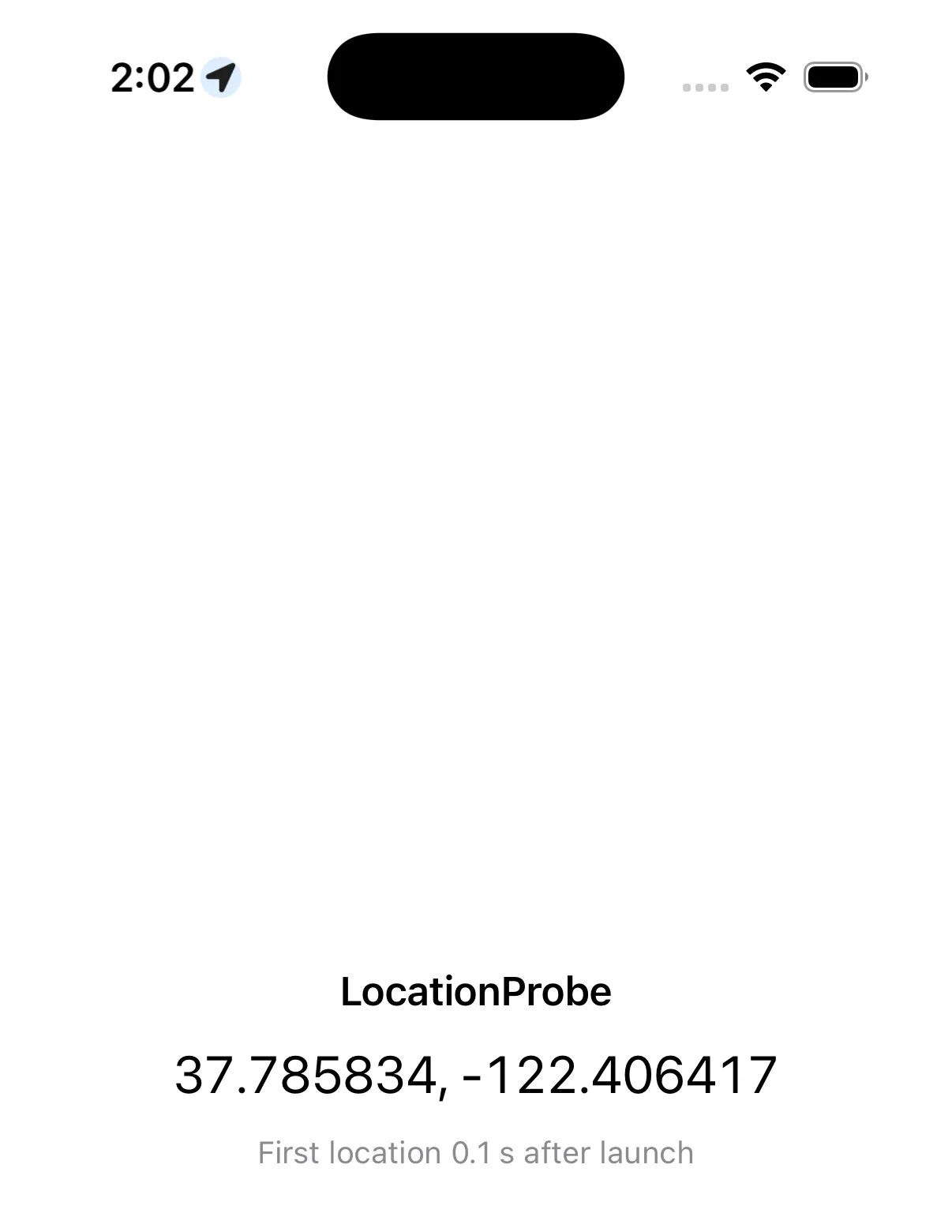
Five seconds after boot. Left: Simulator app closed. Right: Simulator app open with a custom location, already showing a coordinate and the location arrow in the status bar.
| Simulator app | Features ▸ Location | Simulator received a location | LocationProbe got a location |
|---|---|---|---|
| Closed | Anything | No | No |
| Open | None | No | No |
| Open | Custom location in San Francisco | Every second, from about 5 s after boot until the clear | 0.1–0.2 s after launch |
The log of the third run shows the timing. Here it is trimmed, with the script’s own commands added:
14:01:59.119  simctl boot
14:02:04.148  locationd      Accepting New Location
14:02:04.182  locationd      Received an initial location (pinned), unregistering
14:02:05.154  locationd      Accepting New Location
... (once a second)
14:02:11.175  locationd      Accepting New Location
14:02:11.616  simctl location clear
14:02:12.177  simctl launch
14:02:13.779  LocationProbe  Location 37.785834, -122.406417 at 0.1 s
The log confirms the timing: the location had already arrived when the script cleared it.
Experiment 2: why didn’t clearing help?
scripts/leftover-location.sh <UDID> <output-folder> starts with the Simulator app closed and a location chosen in its menu. It goes through six steps, relaunching LocationProbe after each one and watching it for 15 seconds. Here reboot means shutdown, boot and bootstatus:
reboot; xcrun simctl location "$UDID" clear                       # 1
xcrun simctl location "$UDID" set -37.813600,144.963100           # 2  Melbourne
xcrun simctl location "$UDID" clear                               # 3  clear, no reboot
xcrun simctl location "$UDID" set -37.813600,144.963100; reboot   # 4  reboot, no clear
open -a Simulator; reboot                                         # 5  open the Simulator app
osascript -e 'quit app "Simulator"'; reboot                       # 6  quit the Simulator app (AppleScript, like ⌘Q)
What it printed:
Rebooted and cleared:                          no location (0 in 15 s)
Set Melbourne with simctl:                     Location -37.813600, 144.963100 at 0.1 s (3 in 15 s)
Cleared, not rebooted:                         Location -37.813600, 144.963100 at 0.1 s (1 in 15 s)
Set Melbourne again, rebooted, not cleared:    no location (0 in 15 s)
Simulator app open, rebooted, not cleared:     Location 37.785834, -122.406417 at 0.1 s (3 in 15 s)
Simulator app quit, rebooted, not cleared:     no location (0 in 15 s)
Clearing stops new updates (one instead of three) but leaves the last location in place. A reboot removes it, however it got there, unless the Simulator app is open to send it again.
Experiment 3: does it happen in a real UI test?
scripts/run-probe-test.sh <UDID> <output-folder> prepares the simulator the same way, then runs LocationProbe’s UI test. The test launches the app, waits 10 seconds and prints what the app shows:
xcodebuild build-for-testing -project LocationProbe.xcodeproj -scheme LocationProbe \
    -destination "id=$UDID"
# ...reboot and clear as in experiment 1, then:
xcodebuild test-without-building -project LocationProbe.xcodeproj -scheme LocationProbe \
-destination "id=$UDID"# Simulator app closed
PROBE coordinate: No location yet
PROBE detail: Waiting for a location
# Simulator app open, custom location
PROBE coordinate: 37.785834, -122.406417
PROBE detail: First location 0.2 s after launchThe test run with xcodebuild behaves exactly like the manual launch: with the Simulator app open and a location selected, the app under test has a location the moment it starts.
What I do now
For UI tests that run on a local Mac and need to start without a location, two things matter:
- Keep the Simulator app closed while tests run. Have the test script check for it instead of relying on people or agents to remember.
- Reboot the simulator before these tests. Clearing isn’t enough: it can’t remove a location the simulator has already received, such as one set by an earlier test. Locally I reuse the same simulator for speed rather than creating or erasing one each time, so a location left over from earlier tests can easily still be there.
In a test script, that comes down to a few lines:
if pgrep -x Simulator > /dev/null; then
    echo "Quit the Simulator app first: its Features > Location setting can override simctl location clear." >&2
    exit 1
fi
xcrun simctl shutdown "$UDID" 2> /dev/null || true
xcrun simctl boot "$UDID"
xcrun simctl bootstatus "$UDID"
xcrun simctl location "$UDID" clear
I haven’t tried this on CI yet. Hosted CI jobs usually start on a fresh machine and never open the Simulator app, so the first point should take care of itself there. Tests in the same job still share a simulator, though, and a location set by an earlier test can stay for the next one, so the reboot is still worth keeping.
Footnotes
-
XcodeBuildMCP, since renamed MobileBuildMCP, is an open-source MCP server that lets agents drive Xcode and the simulator. Codex gets it through OpenAI’s Build iOS Apps plugin. ↩